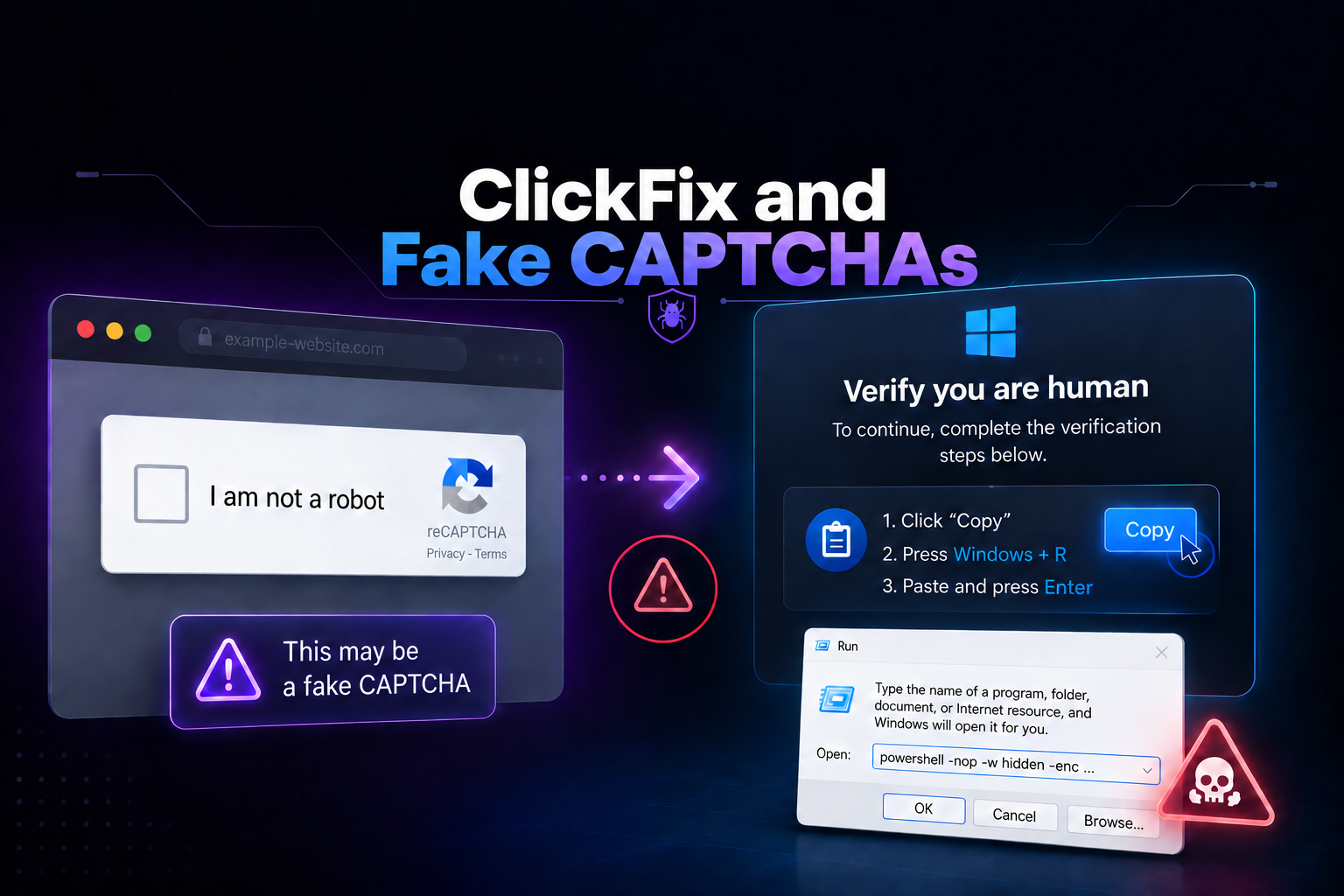
The attack does not begin by exploiting a browser vulnerability or automatically downloading an executable. It starts with something much simpler: a page tells you that you need to prove you are human, fix an error, or complete a check before you can continue.
The instructions seem harmless: press a few keys, paste what we just copied, and confirm. The problem is that what you are pasting is not a verification code. It is a command that starts the infection chain.
This technique is known as ClickFix, and it has become one of the most significant social engineering phenomena of recent years. In its 2025 Digital Defense Report, Microsoft stated that ClickFix accounted for 47% of the initial access methods observed in Microsoft Defender Experts notifications during the period analyzed. ESET, meanwhile, recorded a 517% increase between the second half of 2024 and the first half of 2025, followed by another 108% increase between the second half of 2025 and the first half of 2026.
And the technique continues to evolve. The original fake CAPTCHAs have been joined by fake errors, support pages built around AI, malicious extensions, campaigns targeting macOS, and scenarios that combine the same social engineering idea with OAuth and cloud services.
In this guide
- What ClickFix is
- Why it works so well
- The anatomy of a ClickFix attack
- ClickFix is not invisible to antivirus or EDR
- How it reaches the victim
- How ClickFix has evolved in 2026
- What happens after the command is executed
- How to detect ClickFix
- How to defend against it
- What to do if you have already executed the command
- What this means for offensive security
- Frequently asked questions
What ClickFix is
ClickFix is a social engineering technique that convinces a person to copy, paste, and execute malicious code themselves.
MITRE ATT&CK tracks it under T1204.004 — User Execution: Malicious Copy and Paste. The key difference compared with traditional phishing is that the attacker does not necessarily need to make the victim directly open an executable: instead, the victim is persuaded to use legitimate tools already present on their own system.
The most common lures imitate actions that users already consider normal:
- a fake CAPTCHA or Cloudflare verification;
- a supposed browser error;
- a document that cannot be displayed;
- an update that appears to have failed;
- a problem with audio, video, or an application;
- a support page offering a “quick fix”.
Then comes the truly dangerous part: the page guides the user into opening Run, PowerShell, Windows Terminal, Command Prompt, or, on macOS, Terminal or another tool capable of executing code.
In many campaigns, a previous interaction with the page — such as clicking a verification button — causes JavaScript to place the malicious command on the clipboard. The victim believes they are copying a verification code, but in reality they are preparing the next stage of the attack.
Why it works so well
ClickFix exploits a fundamental difference between how a user thinks and how the operating system interprets an action.
For the user, the sequence looks like this:
Problem
        ↓
The website tells me how to fix it
        ↓
I follow the steps
        ↓
I continue working
For the operating system, the sequence is very different:
Authenticated user
        ↓
opens a legitimate tool
        ↓
voluntarily enters a command
        ↓
executes code with their own permissions
There is no need to exploit a system vulnerability. There does not even need to be an unpatched flaw. The attacker gets a legitimate feature to do exactly what it was designed to do.
In addition, the lure normally appears at a moment when the victim expects to resolve some minor friction: proving they are not a robot, opening a document, or fixing a supposed error. That expectation makes instructions that would look suspicious out of context appear to be part of the normal process.
The anatomy of a ClickFix attack
Although many variants exist, the classic pattern can be summarized in four stages.
1. Create a believable situation
The victim reaches a page that simulates a legitimate check, a technical problem, or an operation required to continue.
Human verification required

To continue, complete the following steps.
2. Prepare the clipboard
After an interaction with the page, it may use JavaScript to place text on the clipboard. The victim normally does not inspect that content because the instructions immediately tell them where to paste it.
3. Move execution outside the browser
The user receives instructions similar to these:
# Illustrative example

Step 1: press Win + R
Step 2: press Ctrl + V
Step 3: press Enter
The pasted text could conceptually look like this:
# REDACTED — NON-FUNCTIONAL

powershell [options] "<malicious code removed>"

↑ the apparent verification action actually starts the infection chain
4. Download or execute the next stage
The first command usually acts only as the entry point. It may use PowerShell, cmd, mshta, rundll32, wscript, curl, or other legitimate tools to retrieve, reconstruct, or execute later components.
This is important: ClickFix primarily describes the social engineering and initial execution mechanism. The chain that follows can change completely from one campaign to another.
ClickFix is not invisible to antivirus or EDR
Saying that ClickFix “bypasses antivirus and EDR” is an oversimplification.
What does happen is that the technique can avoid several defenses designed around the traditional malware delivery model.
| Control | Why ClickFix can make it harder |
|---|---|
| Attachment filtering | There may be no executable attached to the email at all. |
| Download blocking | The first malicious action may be a command entered manually. |
| File reputation | The first stage may use only legitimate tools already installed on the system. |
| Browser sandbox | Execution ultimately takes place outside the browser because the user initiates it. |
But once that command is executed, signals appear that a modern EDR can observe: process creation, PowerShell commands, anomalous use of LOLBins, outbound connections, system changes, and execution of later stages.
Microsoft even documents ClickFix-specific detections and analysis of the RunMRU history used by the Run dialog. MITRE ATT&CK also provides a dedicated detection strategy for correlating a user-facing application — such as a browser or email client — with subsequent command interpreter execution, network activity, and other signals.
How it reaches the victim
The fake CAPTCHA is probably the most recognizable image associated with ClickFix, but it is not the only distribution mechanism.
Phishing
Microsoft observed ClickFix in email campaigns starting in 2024. A link or HTML file can lead to the page that later presents the fake error or fake verification.
Malvertising
Attackers can use malicious advertising or abuse advertising platforms and redirects to bring victims to pages prepared to display the lure.
Compromised websites
A perfectly legitimate website can become the entry point if the attacker manages to modify it and inject malicious JavaScript. This makes the attack especially convincing because the domain visited by the victim may already be familiar to them.
In May 2026, for example, a campaign was documented that compromised more than 700 education and technology-related websites to inject fake Cloudflare verification pages.
SEO poisoning and fake downloads
Another route consists of positioning fraudulent pages for searches involving software, tools, documents, or solutions to technical problems. The victim arrives voluntarily while searching for exactly what the fake page claims to offer.
The common pattern is important: the page does not need to attack the browser immediately; it only needs to make the person trust the instructions.
How ClickFix has evolved in 2026
Fake CAPTCHAs still work, but the ecosystem has grown around the same idea: present a believable problem and turn the “solution” into the attack vector.
| Variant or evolution | How the deception changes |
|---|---|
| Fake CAPTCHA | The victim believes they are completing a human verification step. |
| Fake update / error | Simulates an update, browser error, document viewer problem, or system issue. |
| AI-fix | Presents fake troubleshooting pages or content related to AI assistants in order to exploit the trust users place in these tools. |
| CrashFix | Uses browser extensions, crashes, or fake warnings to create the problem it later promises to solve. |
| ConsentFix | Moves the same guided-interaction model into cloud authorization and OAuth flows to obtain tokens or permissions without requiring the user's password. |
| macOS ClickFix | Adapts the instructions to Terminal, Script Editor, or other mechanisms specific to macOS. |
ESET recorded a 108% increase in ClickFix detections between H2 2025 and H1 2026. The evolution toward AI-fix, CrashFix, and ConsentFix demonstrates that the concept is no longer tied to a specific CAPTCHA template.
Execution techniques are also being adapted. As PowerShell or mshta receive greater attention from security products, some campaigns experiment with other legitimate system tools.
In 2026, for example, chains have been documented that use nslookup to retrieve information through DNS, macOS campaigns that avoid Terminal and open Script Editor instead, and loaders that use .NET components, MSBuild, and other legitimate utilities.
What happens after the command is executed
There is no single “ClickFix malware”. ClickFix is the mechanism that obtains initial execution; the final payload depends on the campaign.
Among the types of malware distributed through these chains are:
- infostealers, designed to steal credentials, cookies, tokens, and browser data;
- Remote Access Trojans (RATs), which provide remote control over the system;
- loaders, whose main purpose is to download or execute additional malware;
- ransomware and post-exploitation tools;
- malware associated with state-sponsored operations.
Lumma Stealer was one of the payloads most strongly associated with ClickFix campaigns during its rapid expansion in 2024 and 2025. Microsoft has also documented families and campaigns distributing RATs, loaders, and other tools.
During 2026, new chains have been observed, including macOS campaigns distributing platform-specific infostealers and ClickFix operations using multi-stage loaders before reaching the final payload.
The problem does not end with the infected computer
An infostealer is particularly dangerous because the attacker's target does not have to be only the user's password.
It may attempt to obtain:
Browser
├── saved credentials
├── cookies
├── session data
└── extensions and wallets

Applications
├── tokens
├── configuration
└── local credentials

Corporate environment
├── email
├── repositories
├── SaaS
├── cloud
└── corporate identity
This is why the compromise of a single endpoint can turn into a much larger identity problem. If an already authenticated session is stolen, simply changing the password may not be enough while valid sessions or tokens continue to exist.
How to detect ClickFix
An effective defense should look for the behavioral sequence, not just a specific string inside a command.
MITRE describes a particularly useful detection chain:
Browser / email / application
                ↓
user interaction
                ↓
PowerShell / cmd / terminal / LOLBin
                ↓
suspicious or obfuscated command
                ↓
network connection / download / subsequent execution
On Windows, there is also a particularly interesting source: RunMRU.
The Run dialog is part of Explorer and stores a history of recently used commands in:
HKCU\Software\Microsoft\Windows\CurrentVersion\Explorer\RunMRU
During an investigation, finding unexpected references there to PowerShell, mshta, rundll32, wscript, curl, or other interpreters can provide useful context about possible execution initiated through ClickFix.
PowerShell Script Block Logging also provides visibility into content processed by PowerShell. Event 4104 is particularly useful for analyzing executed commands and scripts when this telemetry is enabled.
How to defend against it
ClickFix needs several pieces to work. The more layers an organization can break, the lower the probability that the chain will reach the final payload.
1. Awareness
The most important rule can be explained in a single sentence:
If a “verification” page asks you to do this, it should be treated as a potential security incident and closed without following the instructions.
Training should also teach that pasting a command found on a webpage is equivalent to executing code provided by that webpage. The fact that the user still has to press Enter does not make the action safe.
2. Browser, email, and perimeter
- Block known malicious domains and infrastructure.
- Analyze URLs and HTML files received by email.
- Detect pages imitating known CAPTCHA or verification services.
- Restrict access to low-reputation sites where appropriate.
- Keep browsers and extensions under corporate management.
3. Windows endpoints
- Enable PowerShell Script Block Logging to improve visibility into executed scripts and commands.
- Use Application Control through technologies such as WDAC or AppLocker when the environment allows it.
- Apply appropriate attack surface reduction rules for the environment.
- Restrict the Run dialog through Group Policy for user profiles that do not need it.
- Monitor RunMRU and correlate it with process creation and network activity.
- Detect anomalous LOLBin use involving PowerShell, mshta, rundll32, wscript, or transfer tools.
4. Behavior-based detection
Campaigns constantly change domains, obfuscation, and payloads. For this reason, detection based only on specific indicators becomes outdated quickly.
It is more resilient to look for relationships such as:
User browsing activity
        +
unexpected shell launch
        +
unusual command
        +
immediate external connection
        +
subsequent creation or execution
5. Protect identity as well
If the final objective is an infostealer, endpoint protection is only part of the problem.
Reducing the impact also requires controls around identity and sessions: phishing-resistant MFA where possible, managed devices, conditional access policies, limited sessions, and the ability to quickly revoke compromised tokens and sessions.
What to do if you have already executed the command
If someone realizes after executing it that the supposed CAPTCHA was ClickFix, simply closing the window is not enough.
- Isolate the device from the network according to the organization's incident response procedure.
- Immediately notify the security team and provide the URL, approximate time, and steps that were performed.
- Do not unnecessarily destroy evidence. Browser history, RunMRU, PowerShell logs, processes, and network connections may help reconstruct the chain.
- Analyze the endpoint to determine which stages actually executed.
- If credential or session theft is possible, revoke associated sessions and tokens and change credentials from a clean device.
- Review related corporate accounts for unusual logins, authorized applications, or subsequent suspicious activity.
The response should depend on what actually executed. A command blocked before taking any action does not have the same impact as a chain that successfully installed an infostealer.
What this means for offensive security
ClickFix is a good example of why a real intrusion cannot be understood by looking only at technical vulnerabilities.
The browser may be up to date. The system may be fully patched. EDR may be present. And yet, if the attacker convinces a person to correctly use a legitimate feature to execute their code, an important trust boundary has already been crossed.
For a security professional, the value lies in reconstructing the entire chain:
1. How did the victim reach the page?

2. What made it appear legitimate?

3. What action did the user perform?

4. Which process obtained execution?

5. Which controls could have detected it?

6. What did the attacker achieve next?
This way of thinking applies far beyond ClickFix. A real attack combines web, endpoint, identity, credentials, and, in enterprise environments, subsequent movement through the infrastructure.
At SixHack Academy, we work precisely on this offensive mindset: understanding what the system expects, what the user expects, and what happens when an attacker manages to break that relationship of trust.
And when initial access ends up inside a corporate Windows environment, understanding what an attacker can do next requires knowledge of identities, credentials, privileges, and Active Directory. These are the kinds of scenarios covered in Active Directory eXploitation Professional (ADxP).
Initial access is only the beginning.
At SixHack Academy, we train the offensive mindset needed to understand a complete intrusion: from how the first execution is obtained to how an attacker attempts to expand their access inside a real environment.
Frequently asked questions
What is ClickFix?
ClickFix is a social engineering technique that tricks the user into copying, pasting, and executing a malicious command. It is commonly hidden behind fake CAPTCHAs, errors, updates, or support instructions.
How can I recognize a fake ClickFix CAPTCHA?
The clearest sign is a supposed verification asking you to open Run with Win+R, PowerShell, Terminal, Command Prompt, or another system tool and paste a command. Legitimate human verification does not require executing commands on your computer.
Does ClickFix exploit a Windows vulnerability?
Not necessarily. Its primary mechanism is social engineering. The user uses legitimate system functionality to execute the command provided by the attacker. Later stages may use other techniques or vulnerabilities depending on the campaign.
Can ClickFix bypass antivirus or EDR?
It can evade some traditional controls because the first action does not necessarily involve downloading a known executable: the user initiates execution themselves using legitimate tools. However, modern EDR solutions can detect many of the later signals, including suspicious commands, anomalous LOLBin use, network connections, and behavior associated with ClickFix.
What malware does ClickFix install?
There is no single payload. It has been used to distribute infostealers, RATs, loaders, ransomware, and malware associated with different types of threat actors. Lumma Stealer was one of the families particularly associated with its initial expansion.
Does ClickFix only affect Windows?
No. Although many campaigns became popular through Win+R and PowerShell, MITRE includes the technique across Windows, macOS, and Linux, and multiple ClickFix campaigns specifically targeting macOS have been documented during 2026.
Why does it work if the computer is fully updated?
Because ClickFix does not necessarily depend on exploiting vulnerable software. It tries to convince the user to execute code themselves using legitimate system functionality. Staying patched remains essential, but it does not eliminate social engineering attacks.
What are AI-fix and CrashFix?
They are evolutions of the same social engineering idea. AI-fix exploits trust in AI-related content or tools to present fake technical solutions, while CrashFix uses extensions, errors, or warnings to create pressure on the victim before offering the supposed fix.
What is ConsentFix?
It is a related evolution that moves guided interaction into legitimate cloud authentication and authorization flows. Instead of relying only on malware installation, it can abuse OAuth and user consent to obtain access or tokens without directly requiring the user's password.
What should I do if I already pasted and executed the command?
In a corporate environment, immediately report it to the security team and follow the incident response procedure. If there is a risk of infection or credential theft, the endpoint should be analyzed and additional measures such as isolation, revocation of sessions and tokens, and credential changes from a clean device may be necessary.
References
- Microsoft Digital Defense Report 2025 : Microsoft Defender Experts data on ClickFix and its share among observed initial access methods.
- Microsoft — Think before you Click(Fix) : analysis of the attack chain, distribution methods, RunMRU, detection, and protection measures.
- ESET Threat Report H1 2025 : initial ClickFix growth and telemetry data related to HTML/FakeCaptcha.
- ESET Threat Report H1 2026 : evolution of ClickFix during 2026 and expansion into new environments and lures.
- ESET H1 2026 — ClickFix, AI-fix, CrashFix and ConsentFix : data on the 108% increase in detections and the variants observed during 2026.
- MITRE ATT&CK T1204.004 — User Execution: Malicious Copy and Paste : classification of malicious copy-and-paste execution techniques, including ClickFix.
- MITRE ATT&CK DET0340 — Detection Strategy for Malicious Copy & Paste : detection strategy based on correlating user-facing applications, command interpreters, and subsequent behavior.
- CISA, FBI, HHS and MS-ISAC — Interlock Ransomware Advisory : documented example of fake CAPTCHAs and ClickFix being used within a real intrusion chain.
- Microsoft — From open lures to cloaked gates: How a macOS ClickFix campaign learned to hide : analysis of ClickFix campaigns specifically adapted to macOS.
- Jamf Threat Labs — ClickFix technique uses Script Editor instead of Terminal on macOS : ClickFix variant using Script Editor to distribute Atomic Stealer.
- Microsoft — Lumma Stealer : analysis of campaigns combining ClickFix, compromised websites, and EtherHiding to distribute malware.
- Malwarebytes — Tracking PavinLoader across ClickFix and fake download campaigns : recent 2026 example of multi-stage ClickFix chains using legitimate tools and additional loaders.
- Microsoft Learn — PowerShell logging : official documentation on Script Block Logging and the events used to record script execution.